On this page
- How to use FIRST20
- Test log
- What it covers
- If it does not apply
- What is Premium Inboxes
- Who it is for
- Pricing in 2026
- Price calculator
- What you save
- Coupon or annual billing
- Google or Microsoft
- Standard or Insured
- How many inboxes
- Before you order
- Registrar access
- After you pay
- For agencies
- Why use a coupon
- Best time to use it
- Vs buying Google direct
- Things to know
- Customer reviews
- Questions
- Verdict
How to use the Premium Inboxes coupon code FIRST20
The whole thing takes about two minutes once you know where the coupon field is.
Premium Inboxes runs checkout through Chargebee, a billing provider. The coupon field is there, but it is a small link rather than a box.
Here is each step, with what you should see on screen as you go.
Pick provider and tier on the pricing page
The pricing page has a Google and Microsoft switch at the top, and a Monthly and Annual switch beside it.
Pick your provider, leave Monthly selected for now, and click Get Started on Start Up or Insured.
Set the quantity before anything else
The checkout opens with 1 or 30 inboxes already loaded. The discount is a percentage, so your quantity decides what it is worth.
Type your real number in. If you are between 215 and 249, read the savings section first.
Find the coupon link in the order summary
The order summary sits on the right on desktop, and above the payment fields on a phone.
Inside it is a text link for adding a coupon. It is easy to scroll past, and it is where most failed attempts happen.
Type FIRST20 and apply it
Capitals, no spaces, nothing before or after. Click Apply.
A new line appears in the summary showing the coupon and the amount off. The total due drops by 20% of the inbox subtotal.
Read the total before you enter a card
If the total has not moved, the code did not take. Fix it now using the troubleshooting steps, not after paying.
Support can sometimes credit a missed coupon, but that is a favour, not something the code guarantees.
Pay, then complete the onboarding form
Payment creates your account and order. Nothing is built until the onboarding form is complete.
The form asks for domains, registrar access, your sequencer login and sender details. The before you order section lists everything.
What the order summary should show
This is the shape of a correct summary for 50 Standard inboxes. Your numbers change with quantity and tier, the layout does not.
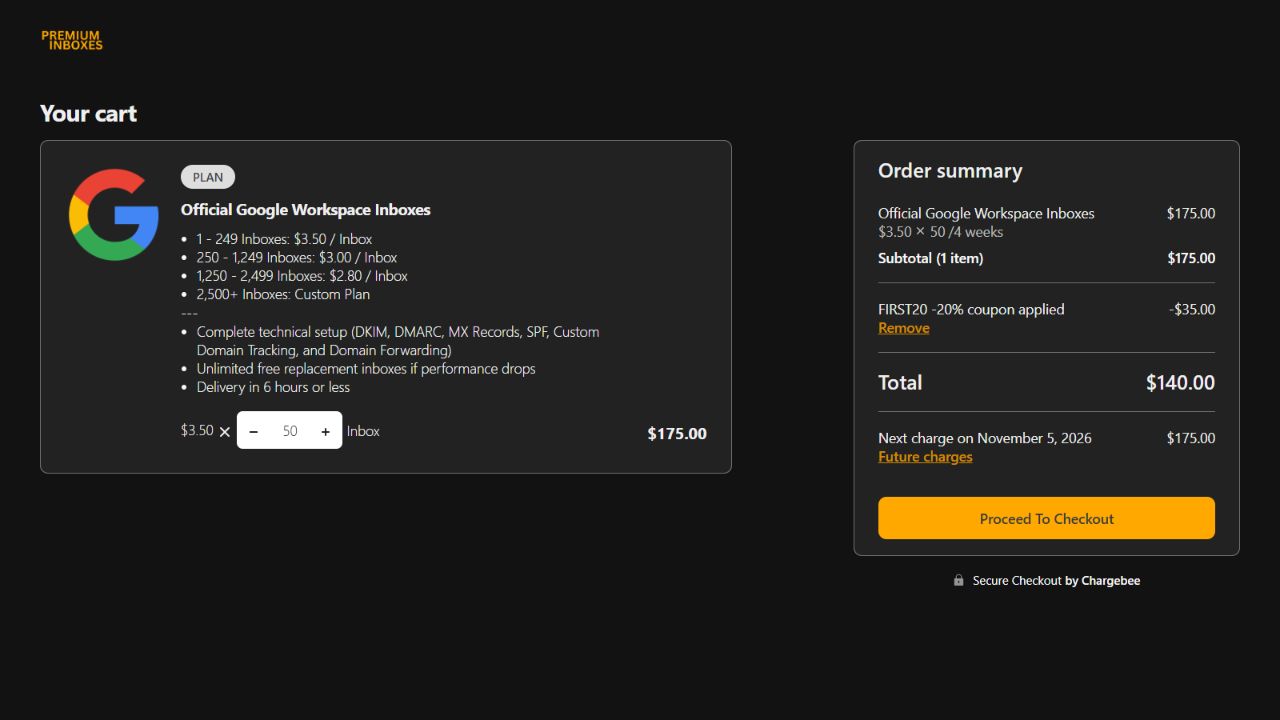
If you want annual billing
The Annual switch on the pricing page shows 20% off list. That is the same percentage FIRST20 gives you once.
Try the code on the annual checkout anyway and read the summary. Whatever discount shows there is what you get.
Our advice is to stay monthly for the first order, use the code, and move to annual once the inboxes have behaved for a cycle or two.
Our FIRST20 test log
A coupon page is only useful if the code works today. So we test it, write down what happened, and date it.
How we test
- Open a fresh Premium Inboxes checkout from the pricing page, in a private browser window with no account signed in.
- Set a real quantity. We use 50 Standard inboxes on Google Workspace so the numbers stay comparable between tests.
- Open the coupon link in the order summary, type FIRST20, and apply it.
- Record the subtotal, the discount line, and the total due, and take a screenshot of the summary.
- Close the checkout without paying.
What counts as working
The code counts as working when the summary shows a coupon line and the total due is 20% below the subtotal.
A code that is accepted but shows a smaller discount, or a code that is rejected, counts as not working, and we say which.
The log
| Date | Order tested | Result | Proof |
|---|---|---|---|
| 8 Oct 2026 | 50 Standard inboxes, Google Workspace, monthly | 20% applied, $175.00 down to $140.00 | Screenshot |
What happens if a test fails
The status line at the top of this page changes the same day, before anything else on the site is updated.
We then check whether the code was retired or replaced, and update this page with whatever is live.
Found a different result at your checkout? Tell us and we re-test the same day.
What the Premium Inboxes coupon code covers
20% off, first order. Here is the exact scope against the current plan list, and why each line is the way it is.
The code applies to
- Google Workspace inboxes at $3.50 each
- Microsoft 365 inboxes at $3.50 each
- The Insured tier at $4.50, either provider
- Any quantity, including the $3.00 and $2.80 rates
- Checkout orders and the client API coupon field
The code does not apply to
- Renewals, which bill at list price from bill two
- Inboxes added to an account later
- Domains, bought from your own registrar
- The Email Control Centre tier
- An account that has already paid once
Why it is first order only
FIRST20 comes from the Premium Inboxes affiliate program. Partners are given a code that discounts a new customer's first payment.
The program pays the partner a share of what the customer keeps paying, so the discount is designed to get you in, not to run forever.
Why the volume rates still count
The code is a percentage off whatever the checkout prices your order at.
At 250 inboxes the checkout already uses the $3.00 Growth rate, so the code takes you to $2.40. At 1,250 it takes $2.80 to $2.24.
Why domains are outside it
Premium Inboxes' main site says to bring your own domains. You buy those at your registrar, so they never appear on the Premium Inboxes bill.
If you ask their team to source domains for you, treat any domain charge as separate from the inbox subtotal the code applies to.
Why renewals and top-ups are excluded
The second bill, four weeks after the first, is at list price. So is every bill after that.
Inboxes you add later are a new order on an account that has already paid, so they are also at list. This is why the first order should be your full order.
If FIRST20 does not apply
Almost every failed attempt comes down to one of the causes below. Work through them in order, before you pay.
| What you see | Likely cause | What to do |
|---|---|---|
| The total did not change | The code was typed wrong or not applied | Clear the field, type FIRST20 in capitals with no spaces, click Apply, and look for the coupon line. |
| No coupon field anywhere | It is a small link, or something is hiding it | Scroll the order summary panel. Turn off ad blockers and privacy extensions, or open the checkout in a private window. |
| Code rejected as invalid | The account has ordered before | FIRST20 is for new accounts. Use an email that has never placed a Premium Inboxes order. |
| Code rejected, new account | Another coupon is already applied | Only one code applies per checkout. Remove the other one, then apply FIRST20. |
| Discount shows but is not 20% | You are on a checkout with its own discount | Annual checkouts carry their own saving. Read which discount applied and decide if that is the one you want. |
| Still not working | Something has changed on their side | Message Premium Inboxes before paying. Then tell us so we can re-test and update this page. |
If you already paid without the code
Contact Premium Inboxes support straight away and ask whether the coupon can be credited to your first invoice.
They may do it as a goodwill gesture. The code itself does not guarantee it, which is why step 5 above says to check before paying.
What is Premium Inboxes
Premium Inboxes is a reseller of official Google Workspace and Microsoft 365 business inboxes, built for cold email.
You tell them how many inboxes you want and which provider. They buy the licences, set everything up, and upload the inboxes into your sending tool.
It is not a sending tool itself. Your campaigns still run from Smartlead, Instantly or a similar sequencer, which you pay for separately.
You order
Pick Google or Microsoft, set a quantity, and hand over your domains.
They build
DNS, SPF, DKIM, DMARC, inboxes, names and photos, checked by a person.
You send
Inboxes arrive in your sequencer with warmup on, usually within 6 hours.
What official accounts means, and why it matters
Cheap inbox sellers often supply accounts that were created in bulk, bought second-hand, or run on servers that imitate Google and Microsoft.
Those accounts tend to get shut down in batches, taking campaigns with them.
Premium Inboxes describes itself as an authorised partner selling real business licences.
You get full admin access to the accounts, proper invoices, and a vendor you can hold to a contract.
What done for you actually includes
- Connecting your domains and setting the DNS records that prove you own them.
- SPF, DKIM and DMARC, the three authentication records that stop your mail being treated as forged.
- Creating each inbox with the sender name, profile photo and address style you chose.
- Forwarding rules, so replies can land in one master inbox if you want that.
- Uploading the inboxes into your sequencer and switching warmup on.
- Replacing any inbox that gets flagged, free, on every plan.
Premium Inboxes says a person checks every DNS record by hand before an order ships. That is the step most self-setup teams get wrong.
Which sending tools it uploads to
Smartlead and Instantly are the two named everywhere on their site. Email Bison, Lemlist, Apollo and Reply.io are also listed as supported sequencers.
If you use something else, ask before ordering. The onboarding form has a field for the platform, and support will tell you if yours is covered.
- Accounts
- Official Google Workspace or Microsoft 365 business licences, never farmed logins
- Setup
- Domains, DNS, SPF, DKIM, DMARC, names and photos, done for you
- Delivery
- Uploaded into Smartlead, Instantly, Email Bison, Lemlist, Apollo or Reply.io
- Live in
- Under 6 hours for most orders
- Replacements
- Unlimited and free, usually the same day
- Support
- Slack channel with the founder, Richard, and his infra team
- Scale
- They report 2,000+ customers and 570,000+ inboxes delivered
- Rating
- 4.9 out of 5 on Trustpilot
Who Premium Inboxes is for, and who should skip it
Done-for-you infrastructure is worth paying for in some situations and not others. Here is where the line sits in our experience.
A good fit
- Founders and small sales teams running 10 to 250 inboxes who do not want to touch DNS
- Agencies onboarding new clients every week and needing inboxes live the same day
- Anyone who has lost a campaign to cheap inboxes getting wiped in a batch
- Teams that want a human to answer when something breaks at 11pm
Probably not
- Sending under 50 cold emails a day, where three inboxes on your own domain will do
- Operators who want to own every admin console and every setting themselves
- Buyers chasing the lowest possible per-inbox price above all else
- Anyone expecting a sending tool. You still need a sequencer on top
If you are in the first column, the coupon lowers the cost of finding out. If you are in the second, no discount changes the fit.
Premium Inboxes pricing in 2026
Pricing is per inbox and billed every four weeks. There are no setup fees, no platform fees and no contracts on the standard tiers.
| Tier | Inboxes | Per inbox | First bill with FIRST20 | What it adds |
|---|---|---|---|---|
| Start Up | 1 to 249 | $3.50 | $2.80 | Full setup, dashboard, sequencer upload, free replacements |
| Growth | 250 to 1,249 | $3.00 | $2.40 | 24-hour health checks and alerts |
| Enterprise | 1,250 and up | $2.80 | $2.24 | Account manager, Slack channel, 24-hour monitoring, extra modules |
| Insured | Any volume | $4.50 | $3.60 | Account manager, Slack channel, priority builds, 24-hour monitoring |
Start Up, 1 to 249 inboxes
This is where most first orders land. $3.50 per inbox buys the full setup, the dashboard, sequencer upload and unlimited free replacements.
There is no monthly commitment. You can cancel from the portal and access runs to the end of the period you paid for.
Growth, 250 to 1,249 inboxes
The rate drops to $3.00. The pricing page adds 24-hour health checks and alerts on top of everything in Start Up.
The step from 249 to 250 is the most important number on the page. It is covered in the savings section.
Enterprise, 1,250 inboxes and up
$2.80 per inbox, with a dedicated account manager, a dedicated Slack channel and 24-hour active monitoring.
The pricing page also lists three modules at this tier, Infrastructure Autopilot, Domain Engine and Send Ops.
Ask their team what each one does for your setup before relying on them.
Insured, any volume
$4.50 per inbox at any quantity. It adds the account manager, Slack channel, priority support and builds, analytics and 24-hour monitoring.
The rate does not drop at 250 or 1,250. The Standard or Insured section works out when the extra dollar is worth it.
Billing every four weeks, not monthly
The checkout plans bill every four weeks. That is 13 bills in a year rather than 12.
So 100 Standard inboxes cost $350 a bill and $4,550 a year, not $4,200. Keep the 13 in mind when comparing with providers who bill monthly.
Annual billing
The pricing page shows annual billing at 20% off list. Expect to commit for a year to get it.
That 20% is the same percentage as FIRST20, but on every bill rather than one. The coupon or annual section compares the two over a year.
The Email Control Centre tier
Above Enterprise sits a managed operations tier at $7,500 a month, by application only, with inboxes billed separately.
It includes round-the-clock monitoring, placement testing, incident response and a named team.
It is not a checkout product and FIRST20 does not apply. Pricing page
Work out your price with FIRST20
Set your inbox count and tier. It shows your first bill with the code and what you pay after that.
Your price with FIRST20
Billed every 4 weeks
The daily email figure uses Premium Inboxes' own guidance of 15 cold emails per inbox per day.
What FIRST20 saves at real order sizes
Per four-week bill, before tax, at today's list prices. The code fires once, so the first order decides what it is worth.
| First order | Rate | List price | With FIRST20 | You save |
|---|---|---|---|---|
| 10 inboxes, Standard | $3.50 | $35.00 | $28.00 | $7.00 |
| 30 inboxes, Standard | $3.50 | $105.00 | $84.00 | $21.00 |
| 100 inboxes, Standard | $3.50 | $350.00 | $280.00 | $70.00 |
| 249 inboxes, Standard | $3.50 | $871.50 | $697.20 | $174.30 |
| 250 inboxes, Growth rate | $3.00 | $750.00 | $600.00 | $150.00 |
| 500 inboxes, Growth rate | $3.00 | $1,500.00 | $1,200.00 | $300.00 |
| 1,250 inboxes, Enterprise rate | $2.80 | $3,500.00 | $2,800.00 | $700.00 |
| 100 inboxes, Insured | $4.50 | $450.00 | $360.00 | $90.00 |
The 250 line
Start Up pricing stops at 249 inboxes. Growth pricing starts at 250. There is no slope between them, it is a step.
249 inboxes at $3.50 cost $871.50 at list. 250 inboxes at $3.00 cost $750.00. You get one more inbox and pay $121.50 less, before any coupon.
With FIRST20 on top, 249 costs $697.20 and 250 costs $600.00. If your maths lands anywhere from about 215 up, order 250.
The same step happens at 1,250. From about 1,167 inboxes up, ordering 1,250 at $2.80 costs less than ordering fewer at $3.00.
Why to front-load the first order
The code fires once, on the first order. Anything you add later is a new order at list price.
An agency that orders 30 inboxes to test and 70 more next month saves $21. The same agency ordering 100 today saves $70.
Replacements are free and there is no minimum, so there is no reason to hold back a buffer. Order what you will actually send from.
What the first year looks like
Over 13 bills, the code shows up as one discounted bill followed by twelve at list. Here is the first year at three sizes.
| Inboxes | First bill | Bills 2 to 13 | First year total | Saved by FIRST20 |
|---|---|---|---|---|
| 30, Standard | $84.00 | 12 × $105.00 | $1,344.00 | $21.00 |
| 100, Standard | $280.00 | 12 × $350.00 | $4,480.00 | $70.00 |
| 250, Growth | $600.00 | 12 × $750.00 | $9,600.00 | $150.00 |
Put next to a full year, the coupon is small. That is exactly why the next section matters.
Round up near 250
249 inboxes cost $871.50. 250 cost $750.00 at the Growth rate. One more inbox, $121.50 less.
Front-load the first order
The code fires once. Ordering 100 today saves $70. Ordering 30, then 70 later, saves $21.
Coupon or annual billing, which saves more
Both are 20%. The coupon takes it off one bill. Annual billing takes it off every bill, in exchange for a year's commitment.
| 100 Standard inboxes | Per bill | First year | Commitment |
|---|---|---|---|
| Monthly, no code | $350.00 | $4,550.00 | None |
| Monthly, FIRST20 on bill one | $280.00 then $350.00 | $4,480.00 | None |
| Annual, 20% off every bill | $280.00 | $3,640.00 | One year |
Annual saves $840 more than the coupon over the year, on this order size. The catch is that you commit before you have used the service.
The order we recommend
- Place the first order monthly with FIRST20. The first bill is the same $2.80 per inbox that annual gives you.
- Run a full second bill at list price. That is the real cost, and the inboxes have now been live for eight weeks.
- If the inboxes held up and support was good, switch to annual and lock the 20% in for every bill after that.
Done this way, you pay list price for roughly one cycle in exchange for not committing a year to a provider you have not used.
If the code and the annual discount both apply at once, you would see two lines in the summary. Read it before paying either way.
Google Workspace or Microsoft 365, which to buy
On price there is no difference. Both cost $3.50 per inbox on Standard and $4.50 on Insured, at every tier, and FIRST20 applies to either.
| Google Workspace | Microsoft 365 | |
|---|---|---|
| Standard price | $3.50, then $3.00 and $2.80 at volume | $3.50, then $3.00 and $2.80 at volume |
| Insured price | $4.50 at any volume | $4.50 at any volume |
| FIRST20 | Applies | Applies |
| Setup and replacements | Done for you, free replacements | Done for you, free replacements |
| Checkout | Its own checkout link | Its own checkout link |
Why Premium Inboxes suggests both
Their own site recommends splitting volume across Google and Microsoft. The reason is simple. The two providers do not fail at the same time.
If Google tightens a filter or flags a batch, your Microsoft inboxes keep sending, and the other way round. Half your pipeline survives any single event.
How to decide the split
- If you are new to cold email, start with Google only. Sequencer connections are the most predictable there and troubleshooting is easier.
- If you already send from Microsoft and your list is corporate, where many recipients are on Microsoft 365 themselves, a larger Microsoft share makes sense.
- Above 100 inboxes, a split of roughly two thirds Google and one third Microsoft is a common starting point. Adjust it after a month of data.
What the split means for the coupon
Each provider has its own checkout, and FIRST20 applies to the first paid order on your account.
So put the bigger half of your order in the checkout you pay first. The second provider's order will be at list price.
Standard or Insured, is the extra dollar worth it
Insured costs $4.50 per inbox at any volume. It does not drop at 250 or 1,250 the way Standard does, so the gap grows as you scale.
| Standard | Insured | |
|---|---|---|
| Price per inbox | $3.50, $3.00 from 250, $2.80 from 1,250 | $4.50 at any volume |
| First bill with FIRST20 | $2.80 | $3.60 |
| Setup, upload, dashboard | Yes | Yes |
| Free replacements | Unlimited | Unlimited |
| 24-hour health checks and alerts | From 250 inboxes | Yes |
| 24-hour active monitoring | From 1,250 inboxes | Yes |
| Account manager and Slack channel | From 1,250 inboxes | Yes |
| Priority build queue and priority support | No | Yes |
| Advanced analytics | No | Yes |
What you are actually paying for
Both tiers replace flagged inboxes for free. The difference is who notices the problem first.
On Standard, you or your sequencer spot a flagged inbox and ask for a replacement.
On Insured, their team watches around the clock and is expected to move before you ask.
Priority build queue means your orders and replacements go to the front of the line. That matters most on a client launch day.
What the extra dollar adds up to
| Inboxes | Standard, every 4 weeks | Insured, every 4 weeks | Extra for Insured | Extra per year |
|---|---|---|---|---|
| 30 | $105.00 | $135.00 | $30.00 | $390.00 |
| 100 | $350.00 | $450.00 | $100.00 | $1,300.00 |
| 250 | $750.00 | $1,125.00 | $375.00 | $4,875.00 |
| 1,250 | $3,500.00 | $5,625.00 | $2,125.00 | $27,625.00 |
Our rule of thumb
- Under 100 inboxes, pick Insured if a client's pipeline rides on these inboxes and nobody on your team watches deliverability daily. The extra is $30 to $100 a bill.
- From 250 inboxes, Insured costs 50% more than Standard. At that size you usually have someone watching, so Standard plus your own monitoring is the better buy.
- From 1,250 inboxes, Enterprise already includes the account manager, Slack channel and 24-hour monitoring at $2.80. Insured at $4.50 makes little sense there.
Whichever you pick, FIRST20 takes 20% off the first bill. You can also start on Standard and ask to move to Insured later.
How many inboxes you need before you buy
Premium Inboxes' guidance is 15 cold emails per inbox per day. Above that, they say, Google and Microsoft start throttling.
We plan to that number, not above it. Pushing 30 or 40 a day from new accounts is the fastest way to turn a cheap inbox into a replacement request.
Work back from daily volume
Decide how many cold emails a day the campaign needs. Divide by 15 and round up. That is your inbox count.
Then decide inboxes per domain. Two or three is common. Divide your inbox count by that and round up for the number of domains to buy.
| Cold emails a day | Inboxes | Domains at 3 each | First bill with FIRST20 | Every 4 weeks after |
|---|---|---|---|---|
| 150 | 10 | 4 | $28.00 | $35.00 |
| 450 | 30 | 10 | $84.00 | $105.00 |
| 750 | 50 | 17 | $140.00 | $175.00 |
| 1,500 | 100 | 34 | $280.00 | $350.00 |
| 3,750 | 250 | 84 | $600.00 | $750.00 |
| 7,500 | 500 | 167 | $1,200.00 | $1,500.00 |
Why inboxes per domain matters
Reputation attaches to the domain as well as the inbox. If one inbox on a domain gets flagged, its neighbours on that domain feel it.
Fewer inboxes per domain spreads the risk but costs more in domains.
Three per domain is the balance most teams settle on, and it matches Premium Inboxes' own calculator.
Do not add a buffer
Some teams order 10% extra inboxes as spares. With Premium Inboxes that is wasted money, because flagged inboxes are replaced free.
Order the number you will send from. If one burns, a replacement arrives rather than a bill.
Or set your own number in the price calculator.
What to have ready before you check out
The coupon applies at checkout, but the build only starts once your onboarding form is complete.
Orders that take days are almost always waiting on the customer, not on Premium Inboxes. Have these five things ready and most orders go live the same day.
- Sending domainsBought at your registrar before you order. The main site says bring your own, so plan on that, and ask their team if you would rather they source them.
- Inboxes per domainDecide two or three. Your inbox count divided by this number is how many domains to buy. The form asks for both figures and they need to match your order.
- Registrar accessThey set your DNS records for you, so the form asks for access to wherever the domains live. Each registrar needs something different, listed in the next section.
- Sequencer loginSmartlead, Instantly, Email Bison, Lemlist, Apollo or Reply.io. Create the workspace first and have the login ready. They upload the inboxes and switch warmup on.
- Sender detailsFirst and last names, the address style you want such as first name or first.last, a password pattern, and a public link to each profile photo. A private Drive link stalls the order.
If you want replies forwarded to one master inbox, decide which address that is.
If your sending domains should forward to your main website, say so in the form.
What the onboarding form asks for each registrar
Premium Inboxes sets your DNS records for you. To do that they need to get into your registrar, and each one has its own way of granting access.
These are the requirements their onboarding form lists today. They can change, so read the form's own instructions as you fill it in.
| Registrar | What they need from you | Before you hand it over |
|---|---|---|
| Cloudflare | Your account login | Move domains here if you can. It is the simplest of the four to grant. |
| Namecheap | Account access in the format their tutorial shows, plus your two-factor backup codes | Generate fresh backup codes just for this and note which ones you shared. |
| GoDaddy | Delegate access sent to hello@premiuminboxes.com, plus your GoDaddy account name, not your email | Delegate access is the safest option here because you never share a password. |
| Porkbun | Account access with all three two-factor checks off, including the unrecognised device check | Switch two-factor back on the moment the order is marked complete. |
Keep it tidy afterwards
Where you shared a password, change it once the build is finished. Where you turned two-factor off, turn it back on. Revoke delegate access you no longer need.
If your domains are spread across several registrars, moving them to one before you order saves a lot of back and forth.
What happens after you pay
The usual path from checkout to cold sends, what to check along the way, and where the coupon stops.
- Right away
You fill in the onboarding form
Domains, access, sequencer login and sender details. This starts the build. The portal shows the order status from here.
- Within about 6 hours
Inboxes go live
Connected in your sequencer with warmup switched on. You get a notification when the order is marked complete.
- First hour after
You check three things
Every inbox shows connected in your sequencer, every domain passes its DNS checks, and the names and photos look the way you asked.
- Any time
Free replacements
If an inbox gets flagged or disconnects, you ask in the Slack channel or portal and they rebuild it, usually the same day.
- Week 4
Second bill at list price
FIRST20 has done its job. This is the real monthly cost, and the right moment to judge the service.
Our warmup plan
Premium Inboxes says most teams start sending within a few days. We take it slower, and this is the plan we follow on every new order.
| When | Cold emails per inbox a day | Warmup | Why |
|---|---|---|---|
| Weeks 1 and 2 | None | On | Fresh accounts need sending history before they carry cold volume. |
| Week 3 | Up to 5 | On | Low volume lets you spot a bad domain before it matters. |
| Week 4 | Up to 10 | On | Ramp while watching bounce and reply rates in the sequencer. |
| Week 5 onwards | Up to 15, never higher | Leave it on | 15 is the ceiling Premium Inboxes gives before throttling starts. |
What a replacement looks like
Your sequencer shows an inbox as disconnected, or Premium Inboxes' monitoring flags it first on the Insured tier.
You report it, and a new inbox is built and uploaded in place of the old one.
Premium Inboxes says most replacements land the same day and always within 24 hours.
There is no charge and no cap on how many times this happens. That policy is the main reason to pay $3.50 instead of $2 somewhere else.
If you decide to leave
Cancel from the portal under subscription management. It processes immediately and your access runs to the end of the period you paid for.
There are no partial refunds for unused time, so cancel just before a bill rather than just after one. Export anything you need before the end date.
Using the Premium Inboxes coupon as an agency
If you run cold email for clients, the coupon works a little differently, because the first-order rule applies per account.
One workspace per client
Premium Inboxes lets you create separate workspaces under one agency account, each with its own orders and subscriptions.
Keep a separate billing identity per client where you can. It keeps invoices clean, and it means each client's first order is a first order.
The API has a coupon field
Every plan includes a client API. The purchase call accepts the provider, domains, inbox count, persona details and a coupon value.
If you create client workspaces by code, pass FIRST20 in that field on the workspace's first order.
The order response reports the discount, so check it in your logs.
White label
The API is built so your client sees your brand, your dashboard and your reports, with Premium Inboxes under the hood.
Your API token is in the portal under Settings. One token covers your whole agency account, and a workspace header targets a specific client.
Scale pricing applies to the account
Volume tiers are priced per order. If several clients each sit at 100 inboxes, each order is at the $3.50 rate.
Ask their team whether consolidated volume can be priced at the Growth or Enterprise rate. At agency scale that question is worth more than any coupon.
Why use a Premium Inboxes coupon code
The first bill is when you are testing a provider you have not used. A 20% cut there lowers the cost of finding out.
It gives you the same per-inbox rate annual billing gives, for one cycle, without committing a year before you trust the inboxes.
On a 250-inbox order it is $150 back. At the Growth rate, that pays for 50 more inboxes for a cycle, or most of a sequencer subscription.
There is nothing to lose by using it. The code does not change the price after the first bill, add a commitment, or alter what you receive.
Best time to use the code
- On your biggest first orderThe code fires once, so put everything you will need for the next month or two into the first checkout.
- When you are close to 250 inboxesRound up to 250, take the Growth rate, then let the code take 20% off that. The same logic applies near 1,250.
- Before you commit to annualUse the discounted first bill and a full-price second bill as your trial, then switch to annual if the inboxes behaved.
- Two to three weeks before a campaignNew inboxes need warmup time. Order with the launch date in mind, not the day you want to send.
- Before you buy domains in a hurryDecide inboxes per domain first, so you buy the right number of domains and the form matches your order.
Premium Inboxes vs buying Google Workspace yourself
Buying licences straight from Google or Microsoft costs more per mailbox, and all the setup is yours.
| Premium Inboxes, Standard | Google Workspace direct | Microsoft 365 direct | |
|---|---|---|---|
| Price per mailbox | $3.50 every 4 weeks, $2.80 on the first bill | $7 a month on annual, $8.40 monthly | About $7 a month after the July 2026 rise |
| DNS and authentication | Done for you, checked by a person | You set it up | You set it up |
| Sequencer upload | Done for you, warmup on | You do it | You do it |
| Flagged inbox | Replaced free, usually same day | You rebuild it and pay for the new licence | You rebuild it and pay for the new licence |
| Contract | None, cancel any time | One year for the $7 rate | Depends on plan |
| Account limits | Any quantity | Business plans cap at 300 users | Depends on plan |
Google and Microsoft per-user prices as reported by Cloudwards and Office Watch, checked October 2026.
What doing it yourself actually involves
- Buy domains and point them at a DNS host.
- Sign up each domain to Google Workspace or Microsoft 365, verify ownership, and create the users.
- Publish SPF, generate and publish DKIM keys, and set a DMARC policy for every domain.
- Set profile photos, names, signatures and any forwarding rules on each inbox.
- Connect every inbox to your sequencer, usually through app passwords or OAuth, and start warmup.
- Watch for disconnects and flags, and repeat the whole list for every inbox that burns.
For 30 inboxes that is a day's work for someone who knows what they are doing, and a week for someone learning. For 100 it never really stops.
Even at full price, Premium Inboxes costs roughly half Google's annual rate per mailbox, with all of that included.
Things to know before you buy
Premium Inboxes is good at what it does. These are the details that catch first-time buyers out, taken from their own policies and pricing.
- It does not send emailYou still need a sequencer subscription on top of your inboxes. Budget for both.
- Refunds are narrowPurchases are non-refundable, with one exception: a licence never activated, with no setup done, requested within 7 days. Decisions are at their discretion.
- Cancelling is easy, not refundedCancel in the portal any time. Access runs to the end of the paid period, with no partial refunds for unused time.
- Do not open a chargeback firstTheir refund policy says starting a chargeback without contacting support breaks the agreement. Email them first.
- Insured does not get volume pricingIt stays at $4.50 per inbox at 250 and at 1,250, so the gap to Standard widens as you grow.
- You are billed 13 times a yearEvery four weeks, not monthly. Multiply a bill by 13, not 12, when you budget.
- The code is once per accountPlan the first order around that, rather than topping up later at list price.
- Registrar access is real accessYou are handing over logins or delegate rights. Change passwords and restore two-factor once the build is done.
From the Premium Inboxes refund policy, cancellation policy and pricing page.
What customers say about Premium Inboxes
Premium Inboxes holds 4.9 out of 5 on Trustpilot. Their site quotes the review count at between 339 and 440 depending on the page, so the number is growing.
Reading through them, three themes come up again and again.
Setup is fast
Reviewers describe inboxes arriving quickly, already connected in their sequencer and ready to warm.
The founder answers
Richard is named in a large share of reviews. Premium Inboxes puts it at 27%, and describes him joining customers' Slack channels.
Support is human
Many reviews mention quick replies from real people rather than templated responses or a ticket queue.
What the reviews do not cover
Trustpilot reviews are weighted towards the first weeks of a service, when setup speed and support are what people notice.
Long-term deliverability depends as much on your list, your copy and your sending volume as on the inboxes. No provider's reviews can promise that part.
Questions about the Premium Inboxes coupon code
Does FIRST20 still work in October 2026?
Yes. It applied 20% off a first order when we last checked on 8 October 2026. The test log above has the details.
How much does FIRST20 save?
20% of your first bill. That is $21 on 30 inboxes, $70 on 100, and $150 on 250 at the Growth rate.
Is FIRST20 a one-time or recurring discount?
One time. It covers the first four-week bill. Every bill after that is at list price.
Does it work on Microsoft 365 inboxes?
Yes. Google Workspace and Microsoft 365 cost the same at Premium Inboxes, and the code applies to either.
Does it work on the Insured tier?
Yes. It takes 20% off the $4.50 Insured rate, the same as on the $3.50 Standard rate.
Does it work on the Growth and Enterprise rates?
Yes. At 250 inboxes the first bill is $2.40 per inbox, and at 1,250 it is $2.24.
Where exactly do I enter the code?
On the checkout page, in the small coupon link inside the order summary. Type FIRST20 and click Apply.
Will I see the discount before I pay?
Yes. A discount line appears in the order summary as soon as the code applies, before you enter card details.
Can I use it on an existing account?
No. It is for a new account's first order. Existing customers save more through volume tiers or annual billing.
Can I use it twice, once for Google and once for Microsoft?
Not on the same account. It applies to the first paid order, whichever provider that is.
Can I combine FIRST20 with annual billing?
Try it on the annual checkout and read the summary before you pay. Whatever discount shows there is what you get.
Do I have to buy domains from Premium Inboxes?
No. The main site says to bring your own and give DNS access. Ask their team if you would rather they source them.
Does the code apply to replacement inboxes?
Replacements are free on every plan, so there is nothing to discount. The code only touches inboxes you buy.
Can I cancel after the discounted first bill?
Yes. Cancel in the portal any time. Access runs to the end of the period, with no partial refunds.
Can I get a refund?
Only within 7 days of purchase, and only if the licences were never activated and no setup was done.
How fast are the inboxes ready?
Most orders go live in under six hours, connected to your sequencer with warmup switched on.
Is there a minimum order?
No. The Start Up tier begins at one inbox. Below about ten, a done-for-you provider is more than you need.
Does the code expire?
No expiry has been published. If it ever stops working, the line at the top of this page will say so first.
Who runs this site?
We publish FIRST20 checkout checks and coupon guides. We may earn a referral fee if you buy through our links. Your price stays the same.
Should you use FIRST20
Yes, if you are opening a new Premium Inboxes account. It is 20% off your first bill, with no commitment and nothing to lose.
The code is worth the most on a large first order, and least on a small test order you plan to top up later. Size the first order properly.
Check the discount line before you pay, run a full second bill at list price, and judge the service on that bill rather than the discounted one.
If the inboxes held up, move to annual billing and lock the same 20% in for every bill after. If they did not, you are free to leave with nothing owed.